Classification with rejection
reject is a python package for classification with rejection. When the prediction’s uncertainty is too high, the model abstains from predicting and the observation is passed on to a human expert who takes the final decision. It is useful for applications where making an error can be more costly than asking a human expert for help.
import reject
from reject.reject import ClassificationRejector
from reject.utils import generate_synthetic_output
print(reject.__version__)
0.3.2
Generate synthetic NN output
In this example, we generate synthetic outputs of a NN with multiple samples of the predictive distribution. The output predictions are of shape (n_observations, n_samples, n_classes) and the true labels (n_observations,). The data generation function uses 10 output classes.
NUM_SAMPLES = 10
NUM_OBSERVATIONS = 1000

y_pred_all, y_true_all = generate_synthetic_output(NUM_SAMPLES, NUM_OBSERVATIONS)
print(y_pred_all.shape, y_true_all.shape)
(2000, 10, 10) (2000,)
ClassificationRejector
Object creation
The ClassificationRejector class rejects predictions from a classification model. It is initialized with the true labels and the predicted probabilities. The predicted probabilities have to have a shape (n_observations, n_classes) or (n_observations, n_samples, n_classes) for models with multiple samples of the predictive distribution such as MC Dropout or Deep Ensembles. The true labels have to have a shape (n_observations,).
rej = ClassificationRejector(y_true_all, y_pred_all)
uncertainty method
The uncertainty/confidence in a prediction can be quantified in 2 ways:
Total uncertainty, which is entropy-based.
=> can be decomposed in aleatoric (i.e. data) and epistemic (i.e. model) uncertaintyConfidence, which directly uses the predicted probabilities.
=> cannot be decomposed
Passing “TU” (total uncertainty), “AU” (aleatoric uncertainty), “EU” (epistemic uncertainty), or “confidence” as unc_type returns their corresponding Numpy array.
rej.uncertainty(unc_type="TU")
array([2.36096002, 2.77688085, 2.81727076, ..., 1.82345458, 2.0367632 ,
       1.89708975])
Passing None as unc_type returns a dict with all 3 uncertainties.
rej.uncertainty(unc_type=None)
{'TU': array([2.36096002, 2.77688085, 2.81727076, ..., 1.82345458, 2.0367632 ,
        1.89708975]),
 'AU': array([0.8389478 , 1.137137  , 1.2077203 , ..., 1.21363037, 1.53001765,
        1.30948878]),
 'EU': array([1.52201222, 1.63974385, 1.60955046, ..., 0.60982421, 0.50674554,
        0.58760097])}
plot_uncertainty method
The uncertainty can be visualized using the plot_uncertainty method. It takes the unc_type as an argument. If unc_type is None, it plots all 3 uncertainties.
fig = rej.plot_uncertainty(unc_type="TU")

fig = rej.plot_uncertainty(unc_type=None)

reject method
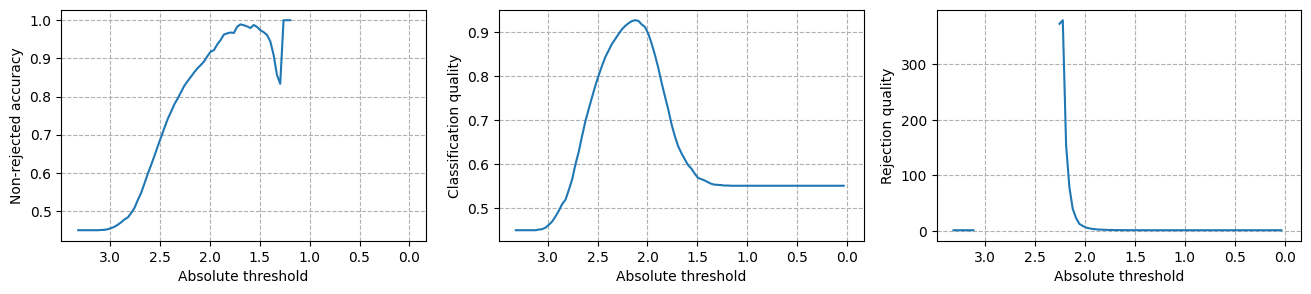
reject is the core function of the package. It takes as arguments a rejection threshold, the uncertainty type to use, and whether the threshold is relative or absolute. The rejection treshold is either relative (i.e. reject threshold percent) or absolute (i.e. reject if uncertainty is >= threshold). It returns 3 evaluation metrics and a boolean array of the same length as the input data, where True means the observation is rejected. The 3 evaluation metrics are Non-rejected accuracy (NRA), Classification quality (CQ) and Rejection quality (RQ), which follows the work of Condessa et al. (2017).
Again, unc_type is one of {‘TU’, ‘AU’, ‘EU’, ‘confidence’}
# implement single rejection point
rej.reject(threshold=0.5, unc_type="TU", relative=True, show=True)
             Non-rejected    Rejected
---------  --------------  ----------
Correct               875          24
Incorrect             125         976

  Non-rejected accuracy    Classification quality    Rejection quality
-----------------------  ------------------------  -------------------
                 0.8750                    0.9255              33.2056
((0.875, 0.9255, 33.205570693309106),
 array([ True,  True,  True, ..., False, False, False]))
plot_reject method
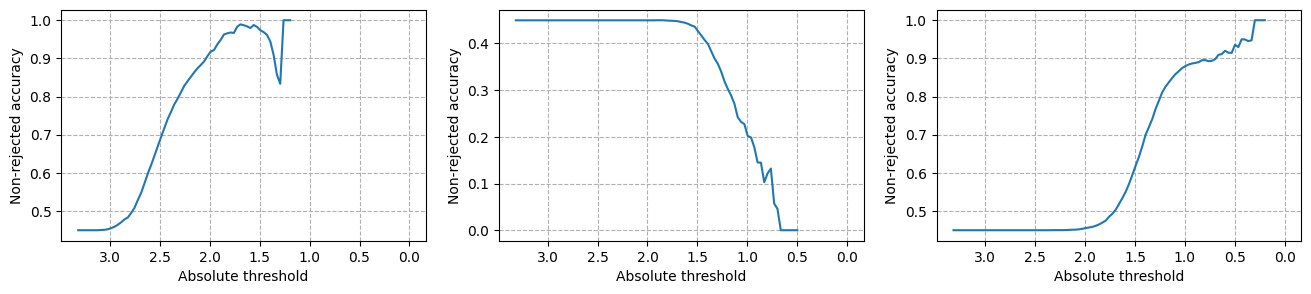
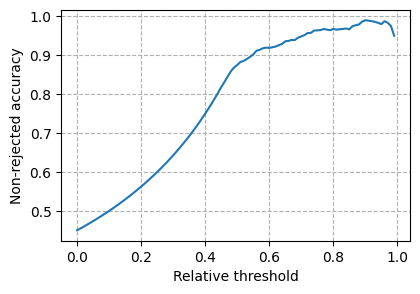
It is interesting to plot the metrics for a varying threshold. plot_reject allows for visualization with different uncertainty types and metrics. At least one of unc_type or metric has to be passed as an argument. If unc_type is None, it plots all 3 uncertainties. If metric is None, it plots all 3 metrics. The threshold can be relative or absolute.
When a an appropriate threshold is selected, the reject method can be used to get the boolean array of rejected observations.
Specific unc_type and metric, relative rejection
fig = rej.plot_reject(unc_type="TU", metric="NRA")
print(fig)
Figure(450x300)
Specific unc_type and metric, absolute rejection
fig = rej.plot_reject(unc_type="TU", metric="NRA", relative=False)
print(fig)
Figure(450x300)

Specific unc_type for all three metrics, absolute rejection
fig = rej.plot_reject(unc_type="TU", metric=None, relative=False)
print(fig)
Figure(1600x300)
Specific metric on all three unc_types, absolute rejection
fig = rej.plot_reject(unc_type=None, metric="NRA", relative=False)
print(fig)
Figure(1600x300)